How to back up QuickBooks Online on every plan
Does QuickBooks Online back up automatically?
Yes and no. Intuit protects the platform. In its own help article on whether you need to back up QuickBooks Online data, Intuit says that whenever there are changes to your company file, your data is saved to two hard drives, that automatic backups are performed every night, and that you do not need to save your data to a flash drive.
The same article adds the part that matters when something goes wrong: because records update with every change, Intuit cannot restore your file to a previous point in time. Those nightly copies exist so Intuit can recover from a hardware failure. They are not a way for you to undo a bad import, a bulk delete, or an app sync that overwrote the wrong records.
So a QuickBooks Online backup you can actually restore from is something you have to set up. What is available depends on your plan.
Which QuickBooks Online plans include backup and restore?
| Plan | Built-in Backup and Restore | Export data to Excel | Automatic backup app (API) |
|---|---|---|---|
| Simple Start | No | Yes | Yes |
| Essentials | No | Yes | Yes |
| Plus | No | Yes | Yes |
| Advanced | Yes | Yes | Yes |
| Intuit Enterprise Suite | Yes | Yes | Yes |
Intuit’s Backup and Restore article covers QuickBooks Online Advanced and Intuit Enterprise Suite and notes that Intuit Accountant Suite does not support Online Back Up and Restore. The export tool is available on every plan. Third-party apps connect through the QuickBooks Online API, which every plan exposes, so they work on Simple Start, Essentials, and Plus too.
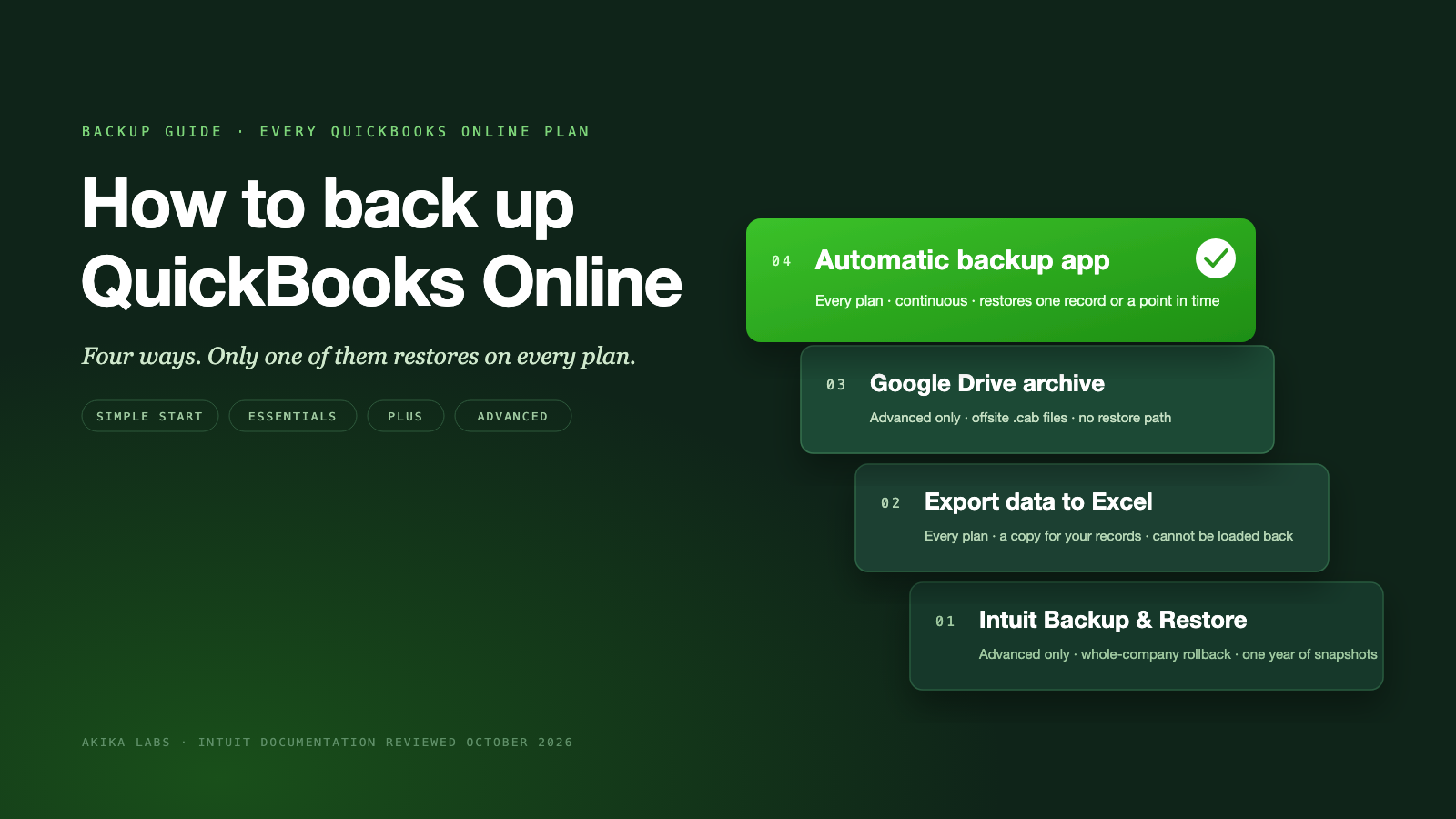
Option 1: Turn on Backup and Restore in QuickBooks Online Advanced
If you are on Advanced, start here. It is included in your subscription.
- Select the Settings gear, then Account and settings.
- Open the Advanced tab and find the Backup section.
- Select Edit, switch on Turn on backups, and save.
Intuit says it backs up your data automatically once the Online Backup and Restore app is on. To take a manual backup before a risky change, select the Settings gear, then Back up company, then Run manual Backup, choose Full, and back up.
What the built-in tool does not do
- It restores the whole company, not one record. Intuit describes a restore as completely replacing the current file with an older version. It does not undelete a specific invoice.
- History is capped at one year. Intuit keeps snapshots from the last year, and backups older than a year cannot be retrieved.
- Some data is excluded. Intuit’s exclusion list includes QuickBooks Payments information, recurring transactions, bank feeds and their links, reconciliation reports, custom reports, custom form templates, and audit log entries. Reconciled transactions do not stay reconciled after a restore. Budgets must be saved separately as CSV, inventory history and adjustments are not included, and tax rates that use expense accounts are placed back into liability accounts.
Option 2: Export reports and lists to Excel (all plans)
Every plan can export a dated copy of its reports and lists. It is free and takes a few minutes.
- Select the Settings gear, then Export data.
- On the Reports tab, pick a date range. Turn on the reports you want: Profit and Loss, Balance Sheet, Trial Balance, General Ledger, and Journal.
- On the Lists tab, turn on Customers, Employees, and Vendors.
- Select Export to Excel, choose a folder, and save. You get one zip file with a separate Excel file for each report or list.
Two limits matter. First, the exported reports cover posting transactions such as invoices, receipts, and bills. Non-posting items such as estimates and purchase orders, and any attachments, have to be exported separately from their own pages. Second, and more important, nothing in that zip can be loaded back into QuickBooks Online. If a customer, invoice, or journal entry is deleted tomorrow, the spreadsheet tells you what it looked like, and you re-enter it by hand.
Treat an export as evidence and a reference copy. It is a reasonable thing to keep before you cancel a subscription or hand a file to an auditor. It is not a QuickBooks Online backup you can restore.
Option 3: Archive a backup to Google Drive (Advanced)
Advanced’s Backup settings include a personal cloud backup option. Link a Google Drive account, then export a backup to it. Intuit stores the archive as .cab files and says you cannot currently restore from a cloud archive. It is an offsite copy of your data for your records, not a second rollback path. Intuit does not document Dropbox or a local download for this feature.
Option 4: Automatic QuickBooks Online backup with an app (all plans)
Third-party backup apps connect to your company through the official QuickBooks Online API. They read supported records and their versions, keep an independent history, and, when you need it, write records back through the same API. That write-back is what turns a copy into a restore, and it is why an API-based backup works on Simple Start, Essentials, and Plus even though those plans have no built-in restore.
When you evaluate an app, check these points before you connect anything:
- Which QuickBooks Online plans and country editions it supports.
- Whether it can restore one record, such as a single invoice, or only roll the whole company back.
- Whether you can review exactly what a restore will change before you approve it.
- How long backup history is retained, and what happens to it when you cancel.
- Whether attachments are captured.
- Whether pricing is per company, per user, or per quote.
Setting up Akika in a few minutes
- Start the free trial. Sign in with your Intuit account from the QuickBooks Online backup page. No credit card is needed for the 7-day trial.
- Connect the company. Authorize Akika for the QuickBooks Online company you want to protect. The initial backup captures supported records, their current versions, and attachment files where the API allows download.
- Let changes flow in. Akika captures supported changes from QuickBooks notifications, runs catch-up backups every 24 hours, and runs a full backup every 7 days after the last completed run.
- Take an on-demand backup before a big change. Before an import, an app sync, or a cleanup, trigger a snapshot so you have a known-good point to return to.
- Restore the right amount. Browse activity, compare versions, and restore one supported record or review a point-in-time recovery. Every restore starts with a plan you can read and approve.
Akika works on Simple Start, Essentials, Plus, and Advanced for $9.99 per company per month on the Standard plan. Saved backup history is retained while your subscription is active, with no one-year cutoff. See the record coverage list and the comparison with Intuit’s built-in backup for details, or compare vendors in our QuickBooks Online backup software guide.
Can you back up QuickBooks Online to a flash drive or to QuickBooks Desktop?
Flash drive. QuickBooks Online has no company file in the Desktop sense, so there is nothing like a .qbb to copy. You can save the Export data zip from Option 2 or the Google Drive archive from Option 3 to a flash drive, a NAS, or Dropbox. Neither file can be opened in QuickBooks Online to reverse a change.
QuickBooks Desktop. Intuit provides a migration tool, downloaded from the Export Overview page inside QuickBooks Online, that exports a QBXML file and imports it into an installed copy of QuickBooks Desktop. It is a one-way move that Intuit emails to you when ready, inventory is not exported for products and services, and some data does not convert. It is a migration path, not a backup routine.
How to restore QuickBooks Online data
- Advanced Backup and Restore. From the Settings gear, open Back up company and choose a restore point. Remember that the whole company is replaced with that earlier version and the excluded items above will need attention afterward.
- Audit log. On any plan, the audit log shows deleted transactions and their details. You can re-enter a deleted invoice or bill by hand from that record. It is manual, but it works when no backup exists.
- Akika. Find the backup from before the mistake, open the record or the point in time, review the restore plan, approve it, and verify the result in QuickBooks. Our walkthrough on restoring a deleted invoice in QuickBooks Online shows the whole sequence on a real sandbox company.
Before an import, app sync, or cleanup
- Confirm which backup you have: Advanced’s built-in tool, an Excel export, an automatic backup app, or none.
- Take a fresh backup or on-demand snapshot and note the time.
- Export the lists you are about to change, so you have a dated reference copy either way.
- Test the import or sync on a small batch first.
- Afterward, compare the changed records against the backup before you call it done.
Frequently asked questions
Does QuickBooks Online have a backup feature?
QuickBooks Online Advanced and Intuit Enterprise Suite include Backup and Restore, which you turn on under Account and settings. Simple Start, Essentials, and Plus do not include it. On those plans you can export reports and lists to Excel or connect an automatic backup app that uses the QuickBooks API.
How do I back up QuickBooks Online for free?
Settings, then Export data, is free on every plan and produces a zip of Excel reports and lists, but it cannot be restored. Advanced’s Backup and Restore is included in that subscription. Akika offers a 7-day free trial with no credit card, then $9.99 per company per month.
Can you back up QuickBooks Online to Dropbox or a flash drive?
Intuit documents Google Drive, not Dropbox, as the archive destination for Advanced backups, and there is no local company file to copy to a flash drive. You can store an Excel export or a Google Drive archive anywhere you like, but neither can be loaded back into QuickBooks Online to undo a change.
How often should I back up QuickBooks Online?
Continuously if you can, and always before an import, an app sync, a bulk delete, or a cleanup. Intuit’s Advanced tool backs up automatically once it is on. Akika captures changes from QuickBooks notifications, runs catch-up backups every 24 hours and full backups every 7 days, and lets you take an on-demand snapshot before a risky change.
Can a backup app recover data I deleted before I connected it?
No. A backup can only restore what it captured. If a record was deleted before your first backup, use the QuickBooks audit log to find its details and re-enter it manually.
Akika Labs provides automatic QuickBooks Online backup and restore for every QuickBooks Online plan.
Read what Akika backs up, see how the restore workflow works, or review the security model. Akika Labs is an independent product and is not affiliated with Intuit or QuickBooks.
Sources
- Intuit: Back up and restore your QuickBooks Online Advanced company
- Intuit: Do I need to back up my data with QuickBooks Online?
- Intuit: Export reports, lists, and more
- Intuit: Export and convert your QuickBooks Online data to QuickBooks Desktop
- Intuit: Use the audit log to re-enter deleted transactions
Intuit documentation reviewed October 12, 2026. Features vary by plan and region.