QuickBooks Online backup: why restore is the hard part
Most people do not start thinking about QuickBooks Online backup when everything is calm. They start thinking about it after a bad import, a sync job gone sideways, a deleted invoice, or a well-meaning cleanup that touched more records than anyone expected.
That moment exposes a quiet truth: taking a copy of accounting data is not the product. Recovery is the product.
A backup system that can only say "here is yesterday's file" still leaves the accountant with the hardest work: figuring out what changed, which records are safe to put back, which relationships have to be rebuilt first, and how to avoid making the ledger worse while trying to fix it.
A useful QuickBooks Online backup is not a static export. It is a versioned, explainable recovery system for a live accounting graph.
The dangerous word is "backup"
"Backup" sounds simple because files trained us to think that way. Copy the spreadsheet. Copy the folder. Copy the database. If something breaks, put the old copy back.
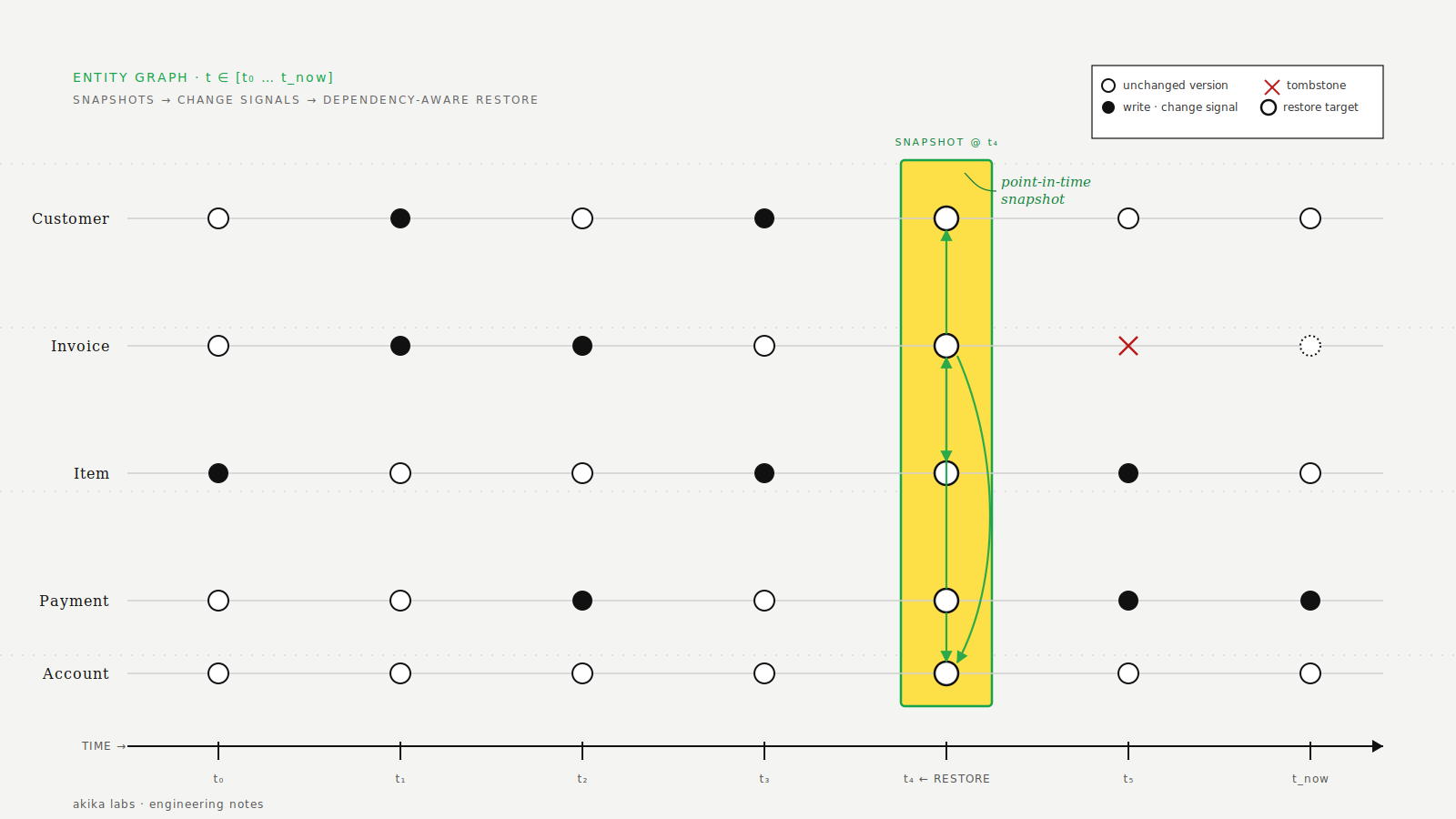
QuickBooks Online is not a folder. It is a hosted accounting system with records, references, permissions, API limits, concurrency controls, attachments, deleted states, and business rules. An invoice points at a customer, line items, tax codes, terms, classes, departments, payments, and sometimes attachments. A restore that ignores those dependencies is not a restore. It is a second incident.
That is why the interesting engineering problem is not "can we fetch data?" It is "can we turn a point-in-time view of the company into a safe recovery plan?"
QuickBooks gives you signals, not a time machine
QuickBooks Online has useful native tools and developer surfaces, but each one solves a different part of the problem.
Audit log
The audit log is valuable for investigation. It can help answer who changed something and when. But Intuit's own guidance for deleted transactions is manual: once a transaction is deleted in QuickBooks Online, it cannot be natively restored; you use the audit log to find details and re-enter the transaction. That is helpful, but it is not a recovery workflow for a busy month close.
Webhooks
Webhooks are a strong change signal. Intuit documents them as event-triggered callbacks that notify an app when data changes in connected QuickBooks Online companies. They are great for knowing that something happened. They are not, by themselves, proof that you have a restorable historical copy of every affected record.
Change Data Capture
Change Data Capture is useful for reconciliation because it returns changed entities for a look-back window. Intuit documents two constraints that matter for backup design: CDC tracks changes within the last 30 days, and responses can handle a maximum of 1,000 objects. That makes CDC a good ingredient for staying current, not a substitute for independent point-in-time snapshots.
The pattern is clear: QuickBooks tells you a lot about change, but a durable backup product has to preserve its own history.
A real snapshot is a graph, not a row dump
For QuickBooks Online backup, the basic unit is not "an invoice JSON blob." The basic unit is a versioned accounting graph.
Read supported QuickBooks entities, metadata, references, attachments where available, and deleted markers.
Store point-in-time snapshots so an accountant can compare today against a known-good state.
Build a restore plan that respects dependencies, conflicts, permissions, and QuickBooks API rules.
A good snapshot preserves enough context to answer recovery questions later:
- What existed at the time? The record payload, stable identifiers, timestamps, and active/deleted state.
- What did it depend on? Customers, vendors, items, accounts, classes, departments, tax codes, terms, and parent-child references.
- What changed since then? The difference between the selected snapshot and the current company state.
- What can be written back? QuickBooks permissions, API support, current record state, and conflicts all matter.
- What should a human approve? Financial recovery should be reviewable before anything touches the live company.
This is where exports fall short. A CSV export can be useful for audit support or manual review, but it usually strips away relationships, API write constraints, and the order of operations needed for a clean restore.
Restore planning is dependency management
Imagine an invoice was deleted. Recreating that invoice may require the customer, item records, tax settings, payment terms, and classes to exist first. If any of those changed after the snapshot, the restore system has to make a decision: use the current object, recreate the missing object, skip the restore, or ask for review.
Now scale that from one invoice to a damaged import batch. You need a plan, not a button.
The restore plan should be explicit about:
- Scope: exactly which records are being recovered and why.
- Order: dependencies before dependents, so transactions are not recreated against missing references.
- Conflicts: records that exist today but differ from the selected snapshot.
- Idempotency: retries should not duplicate transactions because a previous attempt partially succeeded.
- Auditability: who approved the restore, what was written, what failed, and what was skipped.
This is also why "restore everything" is often the wrong first answer. If the blast radius is a deleted bill, the safest recovery is usually granular. If the blast radius is a broad integration mistake, point-in-time recovery may be appropriate, but only after previewing the difference.
What Akika Labs optimizes for
Akika Labs is built around the recovery side of the problem: encrypted point-in-time backups, change review, granular restore, and clear restore status for QuickBooks Online companies.
The product uses official QuickBooks Online APIs, stores snapshots independently, and treats restore as a reviewed workflow instead of a blind overwrite. That matters because accounting data is operational data. The goal is not to make a dramatic rollback. The goal is to put the books back into a trustworthy state with the least unnecessary movement.
In practice, that means three design choices:
- Prefer precision over drama. Recover a single record when one record is the problem.
- Show the difference before the write. A human should understand the impact before restore begins.
- Keep evidence. Backup and restore history should help with audits, client questions, and post-incident review.
A practical checklist for QuickBooks Online backup
If you are evaluating any QuickBooks Online backup approach, ask these questions before you need the answer:
- Can I restore one invoice, bill, customer, vendor, or journal entry without rolling back the whole company?
- Can I preview what changed between two points in time?
- Does the system store independent historical snapshots, or does it only react to recent change events?
- How does it handle deleted records, attachments, references, and conflicts?
- Can I export data for audit review even if I do not restore it?
- Is restore activity logged clearly enough for a client, accountant, or auditor to understand?
- What happens if a restore partially fails because QuickBooks rejects one write?
The best time to answer those questions is before the import, before the app sync, before the cleanup, and definitely before the Friday afternoon panic.
Akika Labs provides secure backup and restore for QuickBooks Online.
Read what Akika backs up, see how the restore workflow works, or review the security model. Akika Labs is an independent product and is not affiliated with Intuit or QuickBooks.